
Order Types Explained: Market, Limit, Stop-Loss, and GTT
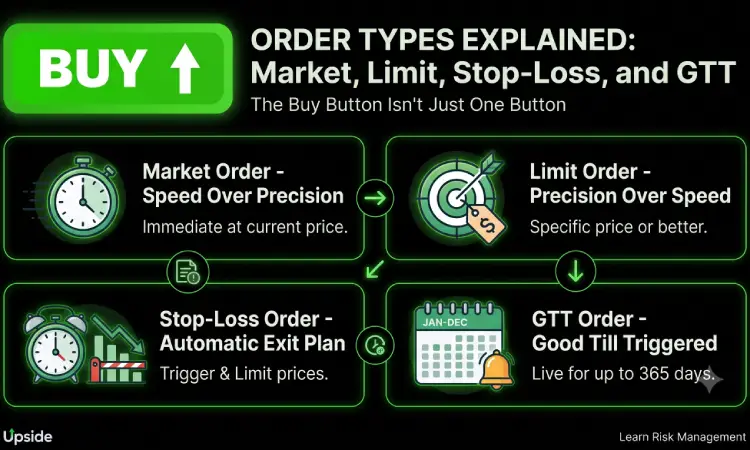
The Buy Button Isn’t Just One Button
Open any trading app and you’ll see it: a simple “Buy” or “Sell” button, and right below it, a dropdown you’ve probably never touched — Market, Limit, SL, SL-M, GTT. Most beginners pick whatever the app defaults to and move on, without realizing that dropdown is one of the most useful risk-management tools they have.
Each order type controls two things: how fast your trade happens, and at what price it happens. Get this right, and you avoid two of the most common beginner mistakes — buying at a worse price than you expected, or watching a loss run further than it should have because nothing was set up to stop it.
Market Order: Speed Over Precision
A market order buys or sells immediately at whatever price is currently available — no price condition attached.
Think of it like hailing the first cab on a busy street. You’re guaranteed the ride, but the exact fare depends on where the meter happens to be at that second. If Reliance is trading around ₹2,850, your market buy order might fill at ₹2,851 or ₹2,852 — close, but not exact.
Use it when: speed matters more than a specific price — reacting to breaking news, exiting fast during a spike, or trading a highly liquid large-cap where the price barely moves between your click and the fill.
Avoid it when: trading thinly traded small-caps or mid-caps, where a market order can fill at a noticeably worse price than what you saw on screen, simply because there isn’t enough volume at that exact level.
Limit Order: Precision Over Speed
A limit order lets you set the exact price you’re willing to buy or sell at. The order only executes at that price or better — never worse.
It’s the opposite trade-off: you know exactly what you’ll pay or receive, but there’s no guarantee the market ever gets there. If it doesn’t, your order simply sits unfilled.
Example: A stock is trading at ₹620. You believe ₹600 is a fair entry, so you place a limit buy at ₹600. If the price never drops to ₹600, you simply don’t buy — which is often exactly what you want, rather than chasing a price you didn’t intend to pay.
Use it when: you have a specific target price and can afford to wait for it.
Stop-Loss Orders: Your Automatic Exit Plan
A stop-loss (SL) order is built for one job: capping your downside without you having to watch the screen all day.
Here’s the part that confuses most beginners — a stop-loss actually has two prices, not one:
- Trigger price: the “wake-up alarm.” Once the stock touches this level, your order activates.
- Limit price: the price you’re actually willing to accept once triggered.
Example: You bought a stock at ₹500. You set a trigger price of ₹480 and a limit price of ₹475. If the stock falls to ₹480, your sell order wakes up and tries to execute at ₹475 or better. If the price crashes straight through ₹475 before your order fills, it won’t execute at all — which is the tradeoff with a standard SL order.
That’s where SL-M (Stop-Loss Market) comes in — once triggered, it converts into a market order instead of a limit order, guaranteeing execution but not the exact price. In fast-moving or gap-down situations, SL-M gets you out; a plain SL order might leave you stuck holding a falling stock because your limit price was never reached.
One critical detail: a regular stop-loss order on NSE is valid only for the trading day it’s placed. If it’s not triggered by 3:30 PM, it’s cancelled — you’d need to re-place it the next day, unless you use GTT instead.
GTT: The Order That Doesn’t Need You Every Day
GTT (Good Till Triggered) solves the exact problem a regular stop-loss can’t: it stays live for up to 365 days, sitting on your broker’s system until your trigger price is hit — without needing to be re-placed each morning.
Example: A stock is trading at ₹620, and you’d only want to buy it if it corrects to ₹500. Place a GTT buy at ₹500, and walk away. Anytime in the next year, if the stock reaches that level, the order fires automatically — no daily screen-watching required.
GTT works both directions — as a long-term buy trigger, or as a stop-loss on a delivery holding you don’t want to babysit every session. Many brokers also support OCO (One Cancels the Other) GTT orders, letting you set both a target price and a stop-loss in a single order — whichever hits first executes, and the other cancels automatically.
One thing worth remembering: a GTT you set six months ago reflects your thinking from six months ago. If the stock’s story has changed since — new news, a shifted outlook — that old trigger might no longer make sense. It’s worth reviewing your active GTT orders periodically instead of forgetting they exist.
A Few More Worth Knowing
- AMO (After Market Order): Placed outside trading hours, queued to execute when the market opens next. Useful when news breaks after 3:30 PM and you don’t want to wait until morning to react.
- IOC (Immediate or Cancel): Executes whatever quantity is available immediately at your price, and cancels the rest instantly rather than leaving a partial order sitting in the book.
- Day Order: The default validity on most platforms — active only until market close (3:30 PM) unless you specify otherwise.
Which One Should You Actually Use?
There’s no single “correct” order type — it depends entirely on what you’re trying to control:
- Need to get in or out right now, on a liquid stock? Market order.
- Have a specific price target and can wait? Limit order.
- Want to protect a position without watching it all day? Stop-loss, or GTT if you want it to last beyond today.
- Want both a target and a downside exit set up in one shot? OCO GTT.
The Real Takeaway
Order types aren’t a technical footnote — they’re your actual control panel for how a trade plays out. A market order without a plan can fill you at a price you didn’t expect. A stop-loss you never set can turn a small loss into a large one. Understanding what each one actually does is one of the smallest lessons in the stock market with one of the biggest effects on your outcomes.
This is exactly the kind of practical, execution-level knowledge that separates someone who’s technically placed a few trades from someone who trades with real discipline and risk control. If you’d rather build that discipline properly — reading charts, setting entries and exits with intent, managing risk systematically — Upside’s Technical Analysis course covers exactly this, alongside the broader chart-reading skills that tell you where to set these orders in the first place.
Frequently Asked Questions
What’s the difference between a market order and a limit order? A market order executes immediately at the current available price, prioritizing speed. A limit order only executes at your specified price or better, prioritizing precision, even if that means the trade never happens.
What is the difference between SL and SL-M orders? An SL (Stop-Loss) order converts to a limit order once triggered, so it might not execute if the price moves past your limit too fast. An SL-M (Stop-Loss Market) order converts to a market order once triggered, guaranteeing execution but not the exact price.
Does a stop-loss order stay active overnight? No. A regular stop-loss order is valid only for the trading day it’s placed and is automatically cancelled if not triggered by market close. For a stop-loss that lasts longer, use a GTT order instead.
What does GTT stand for and how long does it last? GTT stands for Good Till Triggered. It stays active for up to 365 days or until it’s triggered, executed, or manually cancelled — whichever comes first.
Can I set both a target price and a stop-loss in one order? Yes, through an OCO (One Cancels the Other) GTT order, which lets you set a target and a stop-loss simultaneously — whichever price is hit first executes, and the other is automatically cancelled.
What happens if my limit order price is never reached? The order simply remains unfilled and eventually expires based on its validity (typically end of day, unless it’s a GTT order). No trade happens, and no funds are deducted.